Case Study /
XING: Email Design System
Building a unified email design system for Germany's largest professional network
Design Systems /Email /B2C
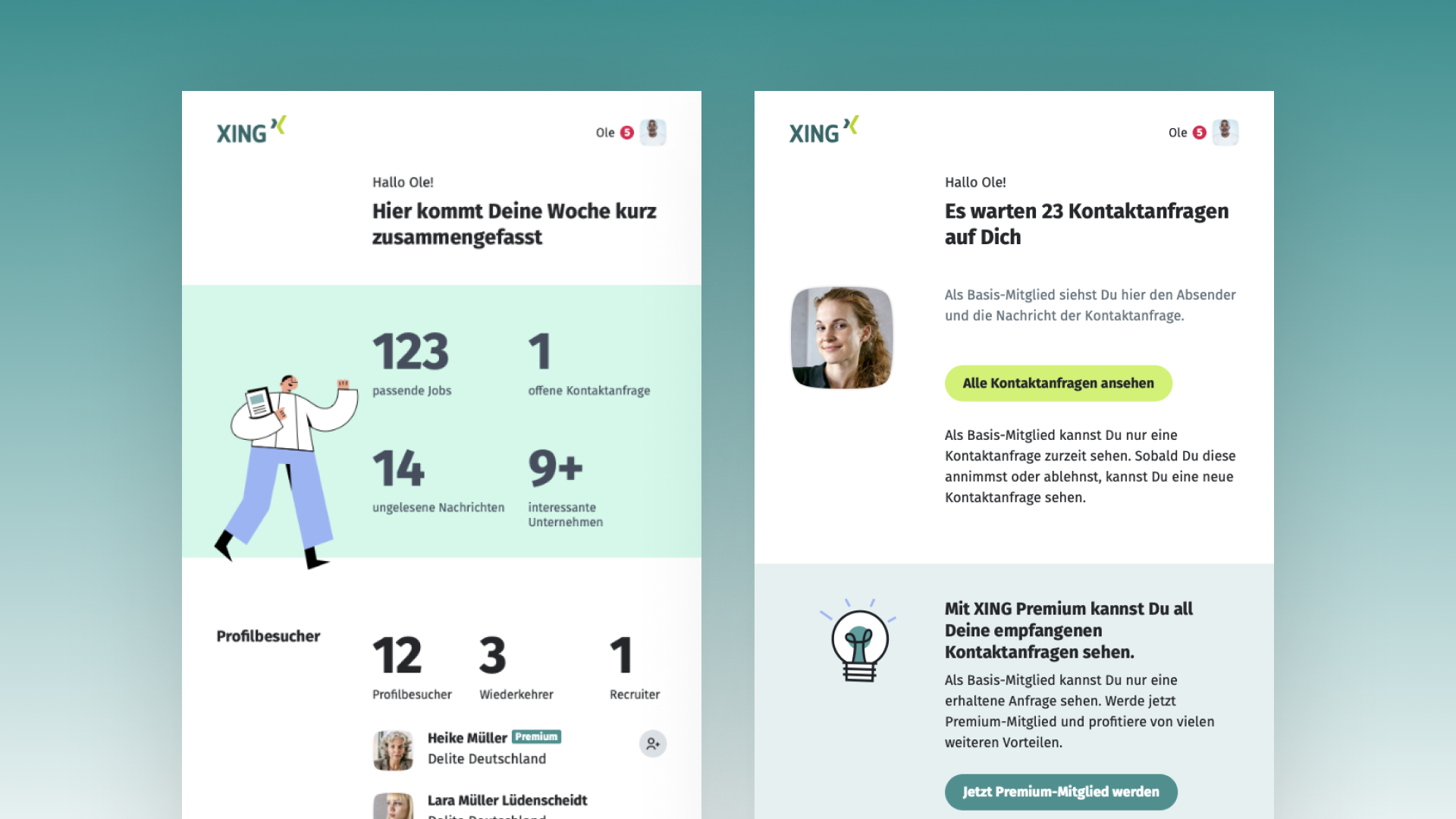
XING had 50+ email templates owned by different product teams, each with different colors, fonts, and layouts. I led the design and later the product management of a unified email design system that improved creation efficiency by 50%, increased click-through rates by 7% per adoption, and saved 600,000 euros annually through a self-service email builder.
Context & Challenge
Company Context
XING was Germany’s leading professional network, reaching millions of members across web, iOS, and Android. The platform supported career networking alongside recruitment and corporate hiring. Email represented one of the platform’s highest-volume communication channels, delivering transactional notifications, weekly summaries, and product updates across jobs, networking, premium subscriptions, events, and marketplace products.
The Problem
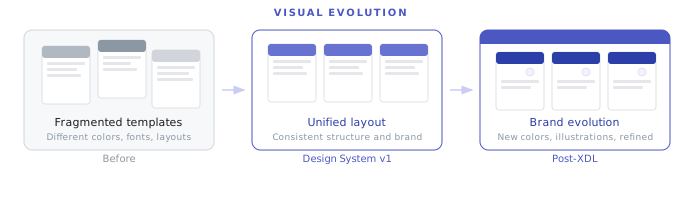
When I started leading email design at XING in 2017, production was fragmented. More than 50 email templates operated on the platform side alone, while marketing maintained a separate catalog of campaign layouts. Each product squad owned and updated templates independently. Over time, this decentralized ownership produced visible discrepancies: divergent palettes, mismatched typography, conflicting layout grids, and inconsistent brand alignment.
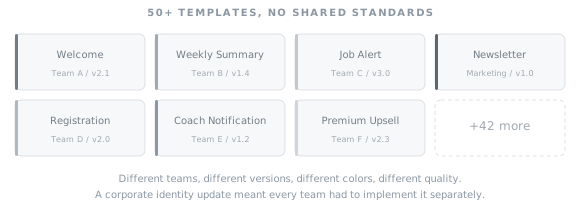
The fragmentation created maintenance bottlenecks. Updating global brand elements required editing individual templates across dozens of squad repositories. When XING launched a corporate brand update, every squad had to refactor their templates independently, exposing the need for shared infrastructure.
Email had historically received less organizational attention than native mobile and web applications. This provided autonomy to establish a modern component architecture quickly without heavy administrative overhead.
Challenges
- Over 50 platform email templates running without shared design tokens or components
- Divergent typography and layouts across squad templates, resulting in inconsistent brand perception
- High engineering overhead required to update individual standalone templates
- Corporate brand refresh requiring synchronized updates across all user-facing communications
- Cross-client rendering constraints across Outlook, Gmail, Apple Mail, and mobile clients
Goals
- Consolidate all platform emails into a unified, token-based design system
- Build an atomic component architecture for efficient email composition and maintenance
- Increase click-through rates and engagement through clearer information hierarchy
- Reduce production time for new email campaigns and product notifications
- Define objective design principles to standardize quality across distributed squads
Success Metrics
Success was evaluated across three core criteria: measurable conversion gains tracked via click-through rates per template rollout, reduced production turnaround times through reusable components and documentation, and voluntary squad adoption driven by demonstrable efficiency gains.
Discovery & Research
Research Methods
I initiated discovery with a cross-functional workshop bringing together stakeholders from brand, marketing, product squads, and platform engineering. The workshop established shared requirements and surfaced friction points across the production pipeline.
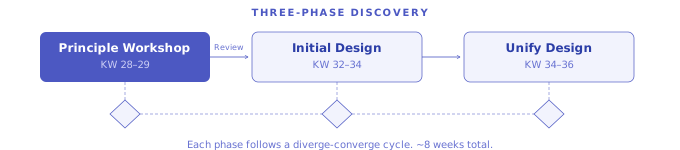
Discovery followed a three-phase structure over eight calendar weeks: a principle workshop (KW 28 to 29) to align requirements, initial design exploration (KW 32 to 34) to establish core component specifications, and unified system integration (KW 34 to 36) with formal stakeholder reviews between phases.
Following the workshop, I audited the full template inventory, cataloging visual styles, structural hierarchy, HTML/CSS rendering patterns, and underlying delivery systems.
Key Findings
Finding 1: Lack of Shared Quality Criteria. Squads evaluated email quality using divergent metrics: some focused on visual detail, others on fast deployment. Without shared principles, teams lacked an objective basis for design reviews.
Finding 2: Structural and Workflow Silos. Discrepancies extended beyond styling: templates, codebases, and deployment pipelines operated entirely independently, preventing global updates.
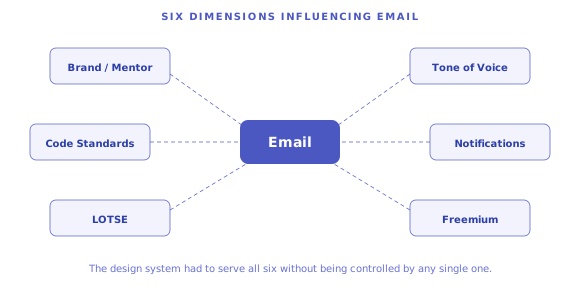
Finding 3: Multi-Stakeholder Dependencies. Email sat at the intersection of brand identity, editorial voice, code guidelines, the central notification system, and commercial freemium goals. The design system needed to harmonize these constraints.
Finding 4: Adoption Required Reduced Production Effort. Squads welcomed standardized patterns provided they reduced manual development overhead and sped up delivery.
Design Process
Strategic Direction
I translated discovery insights into two primary design principles: “Valuable: Encourage and guide users toward clear actions,” and “Functional: Ensure legible, responsive rendering across all email clients.” Below these sat six supportive criteria: Playful, Tailor-made, Trustworthy, Concise, Controllable, and Inspiring. These principles provided objective criteria for design decisions across squads.
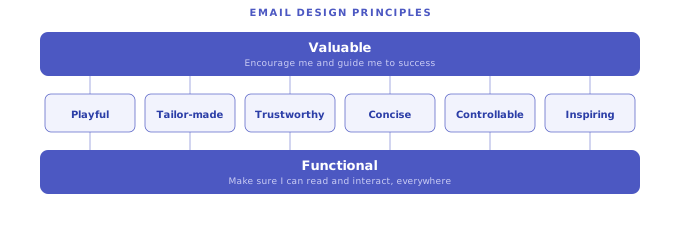
Defining principles before layout drafting prevented subjective aesthetic debates and established shared standards across engineering, product, and marketing.
Architecture Decision: Atomic Design
I structured the system using atomic design principles, mirroring the architecture XING used for web and mobile platforms. The hierarchy comprised: Habitat (client constraints and viewport settings), Atoms (color tokens, typography, spacing units), Grid, Spacing, and composable Content/Media modules.
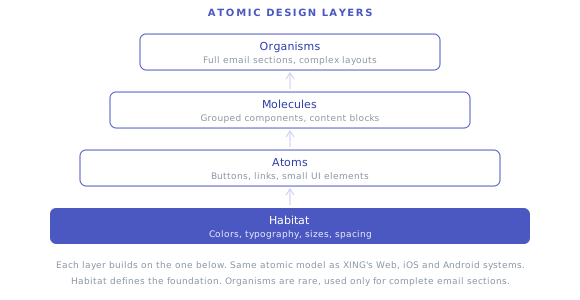
Modular components provided adaptability across varied communication formats while preventing squads from creating custom one-off workarounds.
Exploration and Validation
I assembled system components into production templates and validated layouts across six rounds of user testing. Each redesigned template underwent live A/B testing against its predecessor before full rollout, establishing empirical performance baselines.
Quantitative metrics measured click-through conversion, while qualitative sessions evaluated readability and user comprehension.
System Deliverables
The system delivered production code modules alongside a centralized Sketch component library. The library included embedded onboarding documentation covering layout rules, header styles, image containers, typography scales, and responsive stacking behavior. Designers encountered usage guidelines directly inside their daily tool.
Solution
Overview
A unified email design system spanning all transactional and marketing emails at XING. The system encompassed code components, Sketch libraries, design principles, an A/B experimentation pipeline, and a self-service email builder for marketing.
Feature Walkthrough
Principle-Driven Component Framework. Standardized modules for headers, hero teasers, data cards, list items, and action footers. Updating a base atom automatically propagated across all parent templates.
Systematic A/B Testing Pipeline. Every updated layout was deployed through controlled split tests against legacy versions, safeguarding conversion rates during migrations.
Self-Service Marketing Email Builder. To eliminate agency bottlenecks for non-transactional campaigns, I developed a front-end email builder using design system components. Marketing teams could compose and export responsive HTML emails independently, saving 600,000 euros annually.
Email Types Covered
The system supported diverse communication formats: weekly activity summaries with analytical charts (profile views, job matches, message counts), transactional notifications, subscription upsells, onboarding sequences, group discussions, and co-branded editorial mailings.
Cross-Client Compatibility
Rendering variations across Outlook, Gmail, Apple Mail, and mobile clients were resolved directly at the component level. Testing each atomic module against rendering engines ensured that every parent layout inherited verified client compatibility.
Implementation & Iteration
Phase 1: Foundation (2017 to 2018)
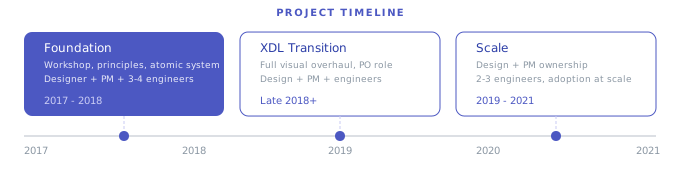
The initial phase encompassed the discovery workshop, architectural definition, component build, and baseline template rollouts. I led design while collaborating with a product manager and 3 to 4 engineers, validating each rollout via A/B testing.
Phase 2: XDL Transition (Late 2018 onward)
When XING introduced the XING Design Language (XDL), I expanded into the Product Owner role for email, managing the design overhaul and engineering implementation. Every component and template was updated to reflect new typography, palettes, and illustrated storytelling elements, with each migration validated through A/B testing.
Phase 3: Scaling and Ownership (2019 to 2021)
In the subsequent phase, I managed the system across design and product management, directing 2 to 3 dedicated engineers. Squad adoption was supported through hands-on guidance, direct training, and embedded Sketch documentation.
Adoption Strategy
Adoption remained voluntary. Squads transitioned because modular components cut development cycles, while documented A/B testing proved measurable increases in user engagement.
Outcomes & Impact
| Metric | Result |
|---|---|
| Email creation efficiency | +50% improvement |
| Click-through rate | ~7% increase per email adoption |
| Marketing cost savings | ~600,000 euros per year via self-service email builder |
| Templates unified | 50+ fragmented templates consolidated into one system |
| Testing approach | 6+ user test rounds, continuous A/B testing on every rollout |
Measurement context: Template production times decreased by half across product squads. Individual templates transitioning to the unified system averaged a 7% increase in click-through rate. Internal production via the self-service builder eliminated agency retainer costs, saving approximately 600,000 euros annually.
Qualitative Impact
The design principles established an objective standard for email reviews across squads. The split-testing framework embedded empirical validation into the regular release cycle.
Organizational Impact
The project established the first centralized email design system at XING, introducing shared governance and the self-service builder. My role evolved from lead designer to combined designer and product owner, demonstrating the value of dedicated communication infrastructure.
Learnings
A design system succeeds through adoption rather than documentation alone. Providing embedded Sketch guides, direct squad support, and verified A/B test results encouraged teams to adopt the framework voluntarily.
Establishing principles before interface drafting was the most effective strategic decision of the project. Clear criteria provided a neutral framework for evaluating layouts across engineering, product, and marketing.
In future platform initiatives, I would advocate for formal parity between email and core application design systems from the start to secure dedicated cross-functional staffing early.
System design requires building for autonomous use. Documentation, modular code components, and embedded guidelines made the email infrastructure self-sustaining across distributed squads.